
Leveraging Distributed Computing for Weather Analytics with PySpark

PySpark provides a DataFrame API for processing data across a cluster. This updated tutorial demonstrates the same transformations in a local Spark session with a deterministic Zurich weather fixture, so the complete example runs without a remote cluster or download.
PySpark requires Java 17 or newer and a configured `JAVA_HOME`. When Java is unavailable, the notebook reports that condition and runs a pandas fallback with the same validation and monthly aggregation. Install Java to exercise the distributed branch.Start Spark locally
spark = (
    SparkSession.builder
    .master("local[2]")
    .appName("relataly-weather-300")
    .config("spark.ui.enabled", "false")
    .getOrCreate()
)
Filter and aggregate
monthly = (
    weather
    .filter(
        F.col("temperature_c").between(-35, 45)
        & F.col("precipitation_mm").ge(0)
    )
    .withColumn("month", F.month("date"))
    .groupBy("month")
    .agg(
        F.avg("temperature_c").alias("average_temperature_c"),
        F.sum("precipitation_mm").alias("total_precipitation_mm"),
    )
)
Spark transformations are lazy. An action triggers execution, and explain() can be used to inspect the physical plan.
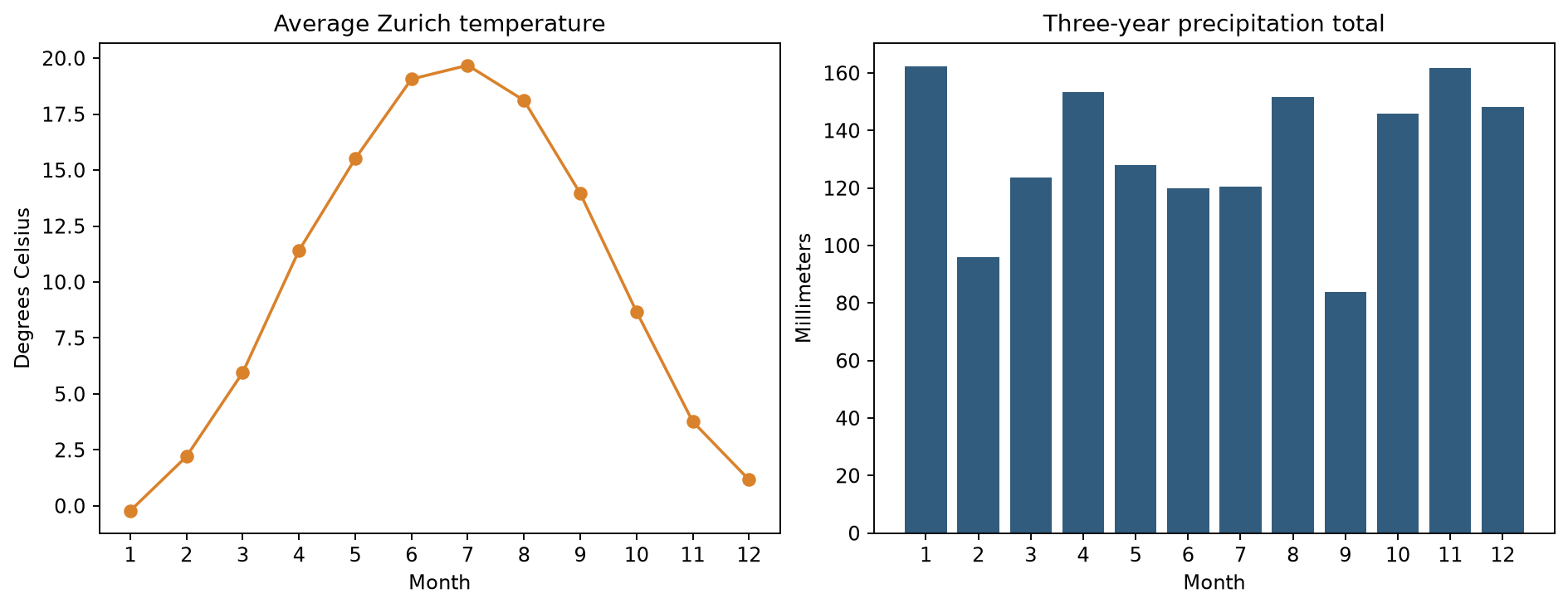
Only the 12-row monthly aggregate is converted to pandas for plotting. Collecting a large distributed DataFrame with toPandas() can exhaust driver memory; filter and aggregate in Spark first.